DAMI Ultra is a browser-based TikTok Shop creator outreach workspace for sellers and teams that need to connect stores, find creators, send outreach tasks, manage creator replies, review sample workflows, and coordinate multi-store operations from one place.
What is DAMI Ultra?
How to connect TikTok Shop to DAMI
How DAMI supports creator outreach
Creator management, samples, and fulfillment
AI DM autopilot and message center
DAMI guide FAQ
What is DAMI Ultra?
DAMI Ultra is designed to reduce the manual work behind TikTok Shop creator outreach. Instead of switching between stores, spreadsheets, creator lists, direct messages, emails, and sample requests, teams can manage the outreach workflow in a single browser-based workspace.
According to the DAMI knowledge base, the platform supports multiple store bindings, creator outreach across authorized stores, scheduled automation tasks, creator message synchronization for the past 30 days, and AI-assisted replies for common creator conversations.
Key DAMI Ultra capabilities
- Bind and switch between multiple authorized TikTok Shop stores.
- Find creators with reusable filter combinations and creator segments.
- Create outreach tasks for invitations, direct messages, and email campaigns.
- Use automation creator pools to run repeatable daily or weekly outreach workflows.
- Manage creator records, tags, blacklists, sample review, and fulfillment data.
- Sync creator messages across authorized stores and use AI DM autopilot for routine replies.
How to connect TikTok Shop to DAMI
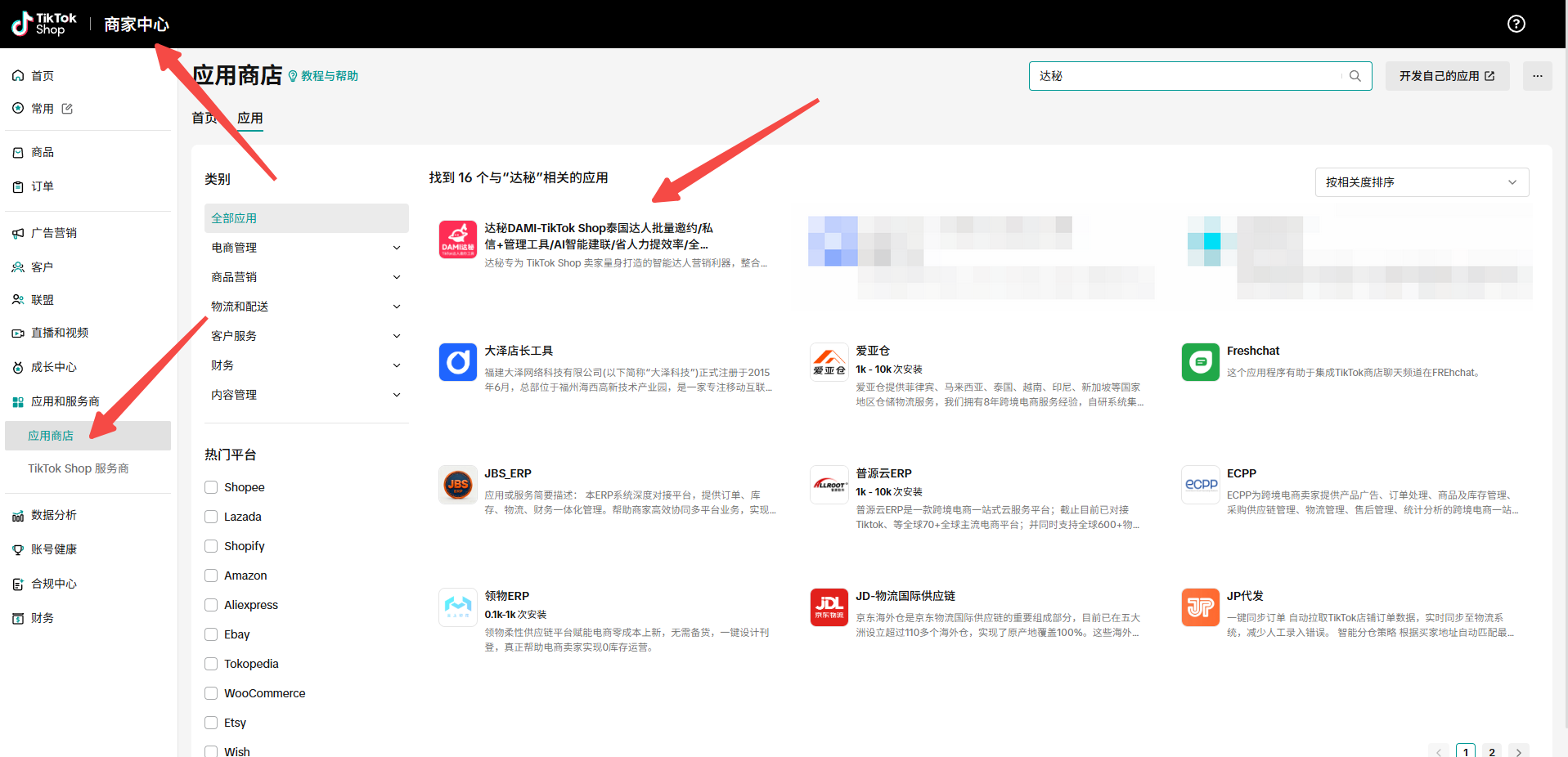
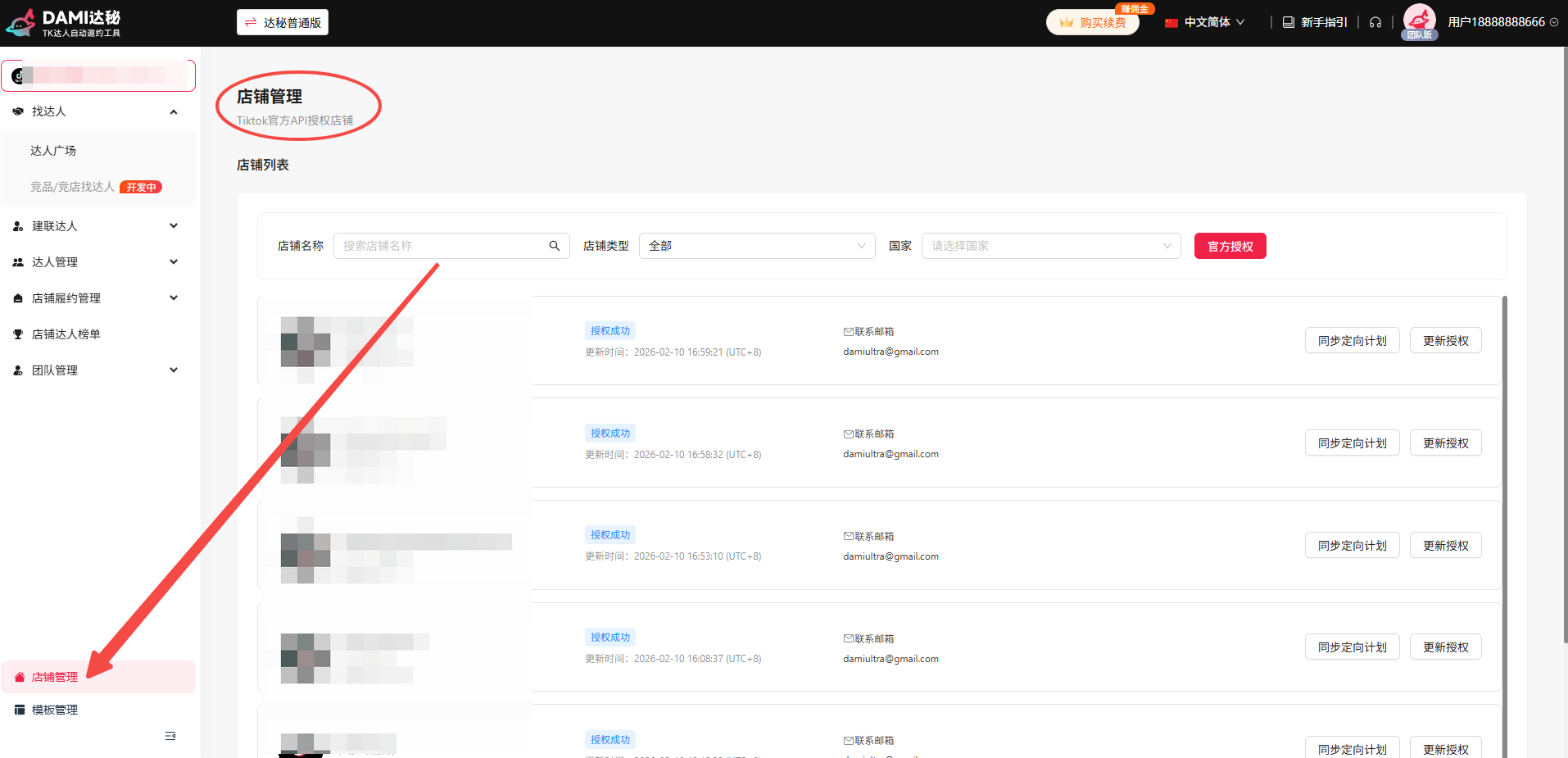
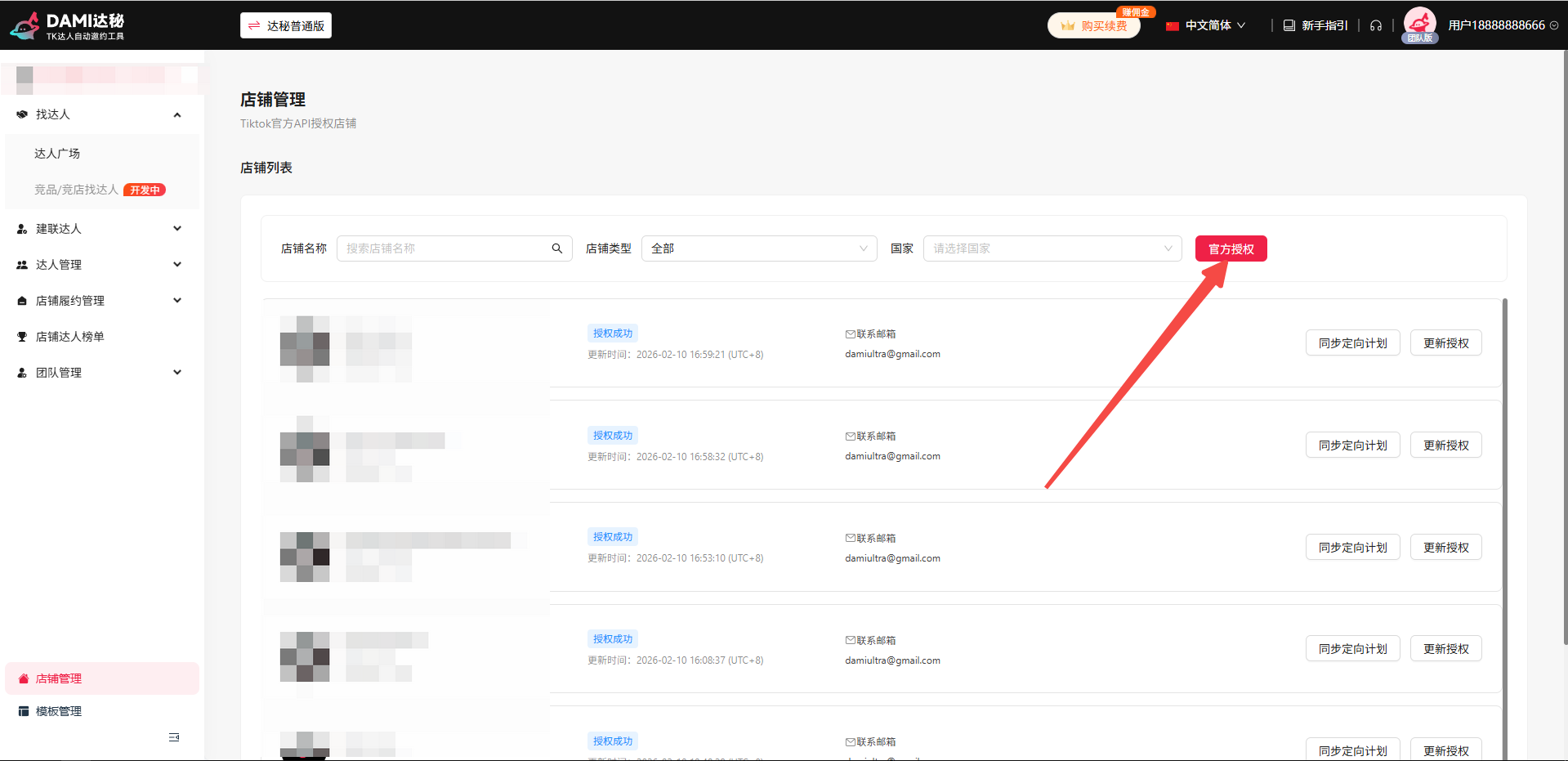
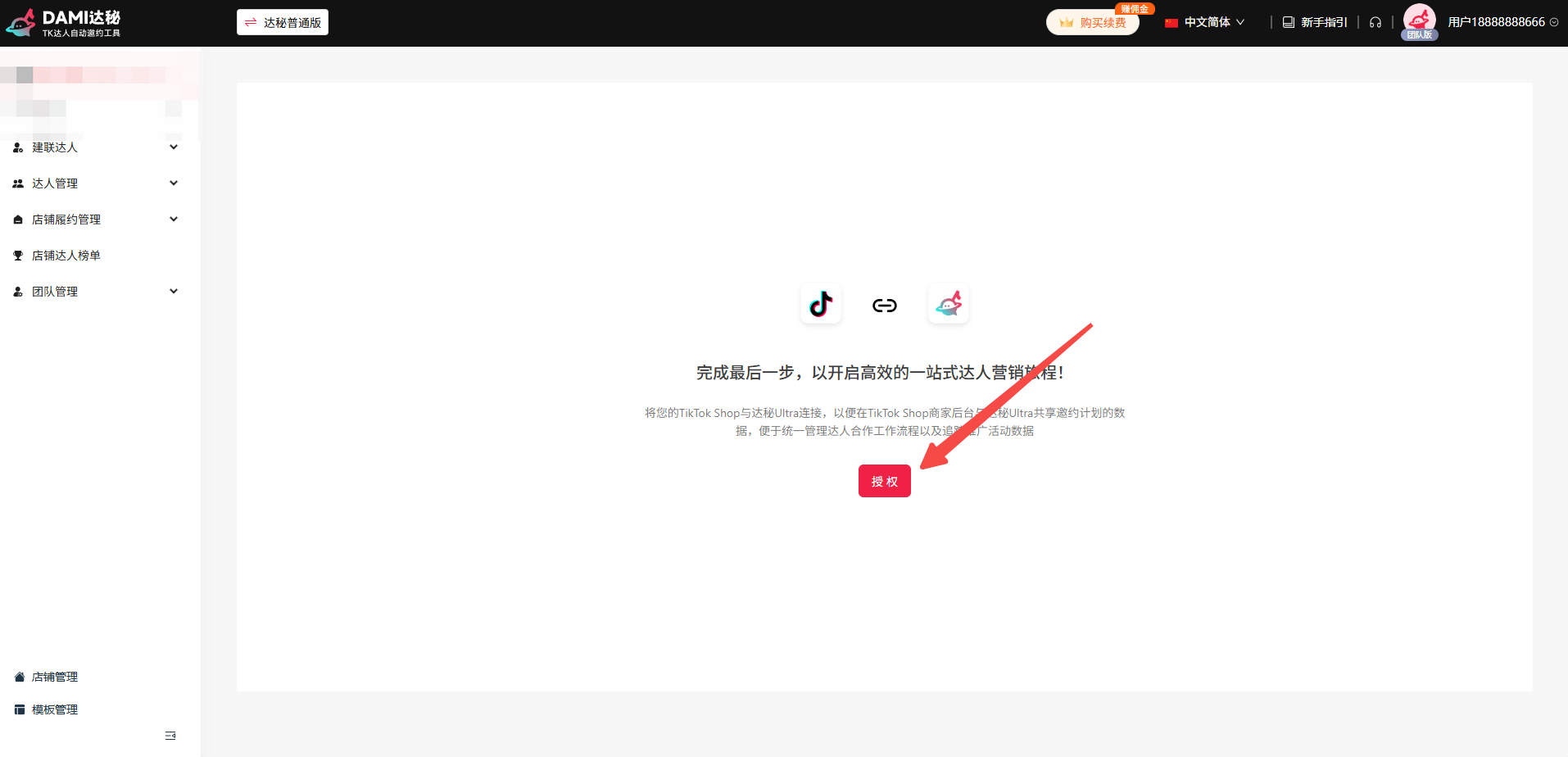
The recommended setup path starts from the TikTok Shop app marketplace and continues inside DAMI Store Management. After authorization, synchronize targeting plans so creator filtering and campaign data remain accurate.
Search for DAMI and confirm you are opening the DAMI app listing used for TikTok Shop seller operations.
The Store Management section is where TikTok Shop API authorization and store synchronization are handled.
Use the official authorization button to connect the store through the supported authorization flow.
After a new store is connected, synchronize targeting plans before starting creator outreach.
How DAMI supports creator outreach
DAMI turns creator outreach into a repeatable workflow: find creators, select the right group, create an outreach task, choose a sending mode, then review success and failure details after the task runs.
Find creators with saved filters
Teams can combine creator filters and save useful combinations for later campaigns. This is useful when different products, markets, creator tiers, or campaign goals require different targeting logic.
Create outreach tasks
After selecting creators, DAMI supports several outreach task types:
- Batch invitations: invite selected creators, use auto-match mode, or target specific creators by creator name.
- Batch DMs: send direct-message outreach while filtering blacklists and previous DM history.
- Mass email: create email outreach tasks through platform-sent email or an authorized mailbox.
- Scheduled automation: use creator pools to run outreach on daily or weekly schedules.
Use the right sending mode
DAMI documentation describes three common operating modes. Curated creator mode filters creators through supported API logic, auto-match mode fills a target quantity automatically, and specific creator mode can be used when a team already has a defined creator list.
Creator management, samples, and fulfillment
Creator outreach does not end after the first message. Sellers need to track replies, sample requests, fulfillment status, creator content, and future collaboration potential. DAMI includes several management areas for that work.
My Creator Library
Creators can be added to an internal library from Creator Square, Outreach Management, or Store Creator Management. Teams can tag creators in bulk and continue outreach to saved creators instead of rebuilding the same list repeatedly.
Sample review and fulfillment tracking
In sample workflows, DAMI can help review creator sample requests based on configured rules. Store Creator Management can synchronize sample-request data, show source targeting-plan IDs, and provide a direct jump into creator chat.
Fulfillment video management
When creators reach a fulfillment-completed status, DAMI can pull related creator videos and show video sales or engagement metrics. This helps teams connect outreach activity with downstream content and affiliate performance.
AI DM autopilot and message center
The Creator Message Center synchronizes creator messages from the past 30 days across authorized stores. Primary accounts can view all store messages, while sub-accounts only see stores assigned to them.
AI DM autopilot can help answer routine creator conversations, sample-shipping questions, receipt confirmations, fulfillment reminders, and standard collaboration follow-ups. DAMI documentation notes that after enabling an AI task, the main page-level switch also needs to be turned on.
Store knowledge base for AI replies
DAMI includes built-in script templates for different collaboration scenarios. Teams can also upload product materials and conversation scripts so the AI reply system can learn from brand-specific information.
Supported upload formats include .txt, .doc, .docx, .xlsx, and .csv.
Recommended DAMI setup checklist
- Authorize each supported TikTok Shop store through the official authorization flow.
- Synchronize targeting plans after connecting or updating store authorization.
- Create reusable creator filters for different products and markets.
- Use tags and creator libraries to avoid rebuilding the same creator lists.
- Review task success and failure reasons instead of measuring only outreach volume.
- Keep sample, fulfillment, and creator content status connected to outreach performance.
DAMI guide FAQ
Is DAMI Ultra installed as a browser extension?
No. The DAMI knowledge base describes DAMI Ultra as a browser-based workspace. Teams can launch outreach tasks through the browser without relying on a local desktop client or browser extension.
Which TikTok Shop regions are mentioned in the DAMI documentation?
The DAMI guide mentions Southeast Asian markets including Indonesia, Vietnam, Singapore, Malaysia, the Philippines, and Thailand, as well as United States local and cross-border stores and Mexico.
What should I do after authorizing a new store?
Synchronize targeting plans after authorization. This is especially important if multiple outreach tools are used, because the sync keeps creator filtering and invitation data more accurate.
Why do some creators fail during invitation tasks?
The DAMI documentation notes that some invitation failures may not be fully avoidable during the outreach process. Recommended handling includes creating a new task, using auto-match mode, exporting failed creators, or using a retry workflow.
Why is there no data in fulfillment video management?
Fulfillment video data depends on creators having a fulfillment-completed status inside Store Creator Management. If that count is zero, video data may not appear.
Build a more organized TikTok Shop creator outreach workflow
Use this DAMI guide as the starting point for store authorization, creator discovery, outreach tasks, message management, and sample follow-up.
This article is based on the local DAMI Yuque knowledge base used for TKDAMI website content planning. TikTok, TikTok Shop, and related marks belong to their respective owners.